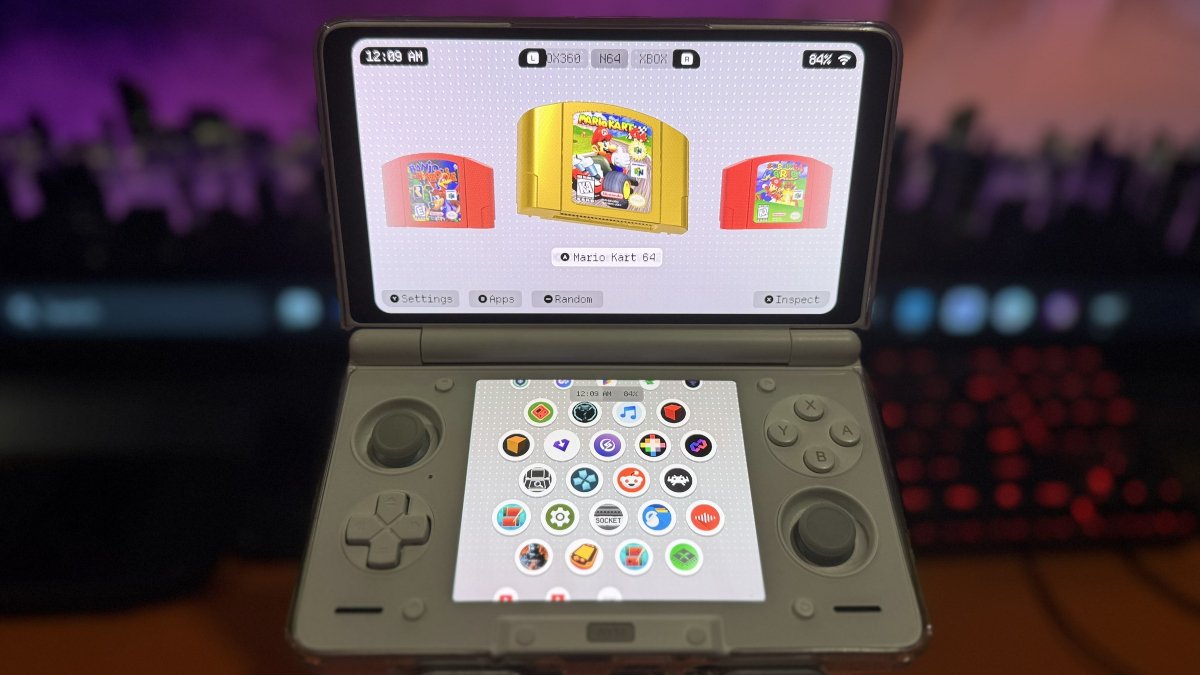
Remember rummaging through your collection of games, looking for something to play? Socket wants to bring a little of that experience back to modern Android handhelds, minus the clutter of cartridges and discs scattered across your room.
Developed by Depmots, Socket is a gaming frontend that presents your collection as customizable 3D cartridges and discs, complete with artwork, sound effects, and animations. It’s designed with smaller, curated libraries in mind, giving your favorite games a little more personality than a traditional list of ROMs.
Socket hasn’t been around very long, but development has been moving quickly. Version 0.3.2 arrived in August 2026, bringing additional system support and cartridge customization options.
By September, Socket had reached version 0.5.0, with the developer making the older 0.3.2 build available to everyone for free. Now, just a few weeks later, version 0.8.0 has arrived.
That’s quite a few updates in a relatively short period. And while version numbers don’t necessarily tell the whole story, Socket has been expanding beyond its original visual presentation with improvements to performance, navigation, and handheld compatibility.
The headline feature in Socket 0.8.0 is dual-screen support, making it particularly interesting for owners of handhelds like the AYN Thor. The bottom display can now show Android apps, while Socket also introduces improvements to game organization, controller navigation, and performance on less powerful devices.
| Display & Performance | |
|---|---|
| Dual-Screen Support | Supports dual-screen handhelds such as the AYN Thor, with Android app management on the bottom display. |
| In-Game Display | The secondary screen can show a dimmed snapshot and playtime timer while gaming. |
| Performance | Optimizations for lower-powered handhelds and improvements to frame pacing. |
| Library & Navigation | |
| Playtime Tracking | Displays time played for individual games. |
| Game Sorting | Sort games by title, most played, recently played, or recently added. |
| Random Game | Option to randomly select a game from your collection. |
| On-Screen Keyboard | Controller-friendly keyboard supporting the D-pad, analog sticks, and touch. |
| Additional Controls | Jump by letter, optional haptic feedback, and improved controller layout detection. |
| Fixes & Compatibility | |
| Emulator Launching | Improvements to emulator launching, including RetroArch and DuckStation fixes. |
| Stability | Fixes for platform-switching freezes, controller mapping issues, and crashes. |
Worth a Look?
What makes Socket interesting isn’t necessarily the number of features it offers. It’s the way it presents your games. There’s something appealing about a frontend that makes choosing what to play feel like digging through a collection of physical cartridges.
The addition of dual-screen support gives Socket another reason to stand out, particularly as more Android clamshell handhelds arrive on the market.
I tossed my coin to the Witcher, I mean Patreon, and installed Socket 0.8.0 on my AYN Thor. Downloading and installing the APK was business as usual. The interface took me a minute or two to wrap my head around, but once I had my first system configured, I was off and running.
I really enjoyed browsing through the cartridges and discs for the systems I’d added. Talk about a trip down memory lane.
| Free Public Release | |
|---|---|
| Version | Socket 0.3.2, available from the official website. |
| Features | 3D cartridges and discs, customizable artwork, launch animations, and emulator integration. |
| Dual-Screen Support | Not included in the public version. |
| Patreon Release | |
| Version | Socket 0.8.0, available to Patreon supporters. |
| New Features | Dual-screen support, playtime tracking, additional sorting options, performance improvements, and more. |
| Subscription | One month provides access to the supporter releases available during your membership. |
| After Canceling | Downloaded versions remain usable without an active subscription. |
| Future Updates | New supporter releases require an active membership or resubscription, unless subsequently made public. |
| Nintendo | NES, SNES, Nintendo 64, GameCube, Wii, Wii U, Switch, Game Boy, Game Boy Color, Game Boy Advance, DS, 3DS |
| Sony | PlayStation, PlayStation 2, PlayStation 3, PSP |
| Sega | Dreamcast |
| Microsoft | Xbox, Xbox 360 |
| Other | Android apps |
| Download Socket | Download the free 0.3.2 APK from the official website, or get the latest release through Patreon. |
| Install APK | Open the downloaded APK on your Android device. If prompted, allow installation from that source. |
| Configure Socket | Launch Socket and follow its setup options to configure your game collection. |
| Add Games | Add your games and customize their cartridge or disc artwork as desired. |
| Configure Emulators | Set up compatible emulators to launch your games. Socket is a frontend and does not emulate games itself. |
| Start Playing | Browse your collection, select a cartridge or disc, and launch your game. |
| Socket Website | Official project information and free public APK download. |
| Socket Patreon | Supporter releases, development announcements, and updates. |
| Socket 0.3.2 | Developer release information for the older public build. |
| Socket 0.8.0 Coverage | Retrohandhelds.gg: Overview of the latest update and its features. |