If it were December, I’d call this the 12 Days of ARMSX3. But alas, it’s only early November, and the updates keep coming. Some quick math tells me that since October 27, ARMSX3 has received 11 updates in just 12 days. Is anyone in the holiday spirit yet?
ARMSX3 is moving beyond simply getting PS3 games to launch on Android. The developers are increasingly focused on making those games perform better, run reliably, and offer features suited to handheld hardware. From my firsthand testing, it’s still not a plug-and-play experience across the board, but things continue to improve with each round of updates. Remember, kids, it’s too tough to do PS3 backward compatibility natively on the PS5, at least that’s what I read on Reddit!
Three common themes connect versions 1.6.1 through 1.6.6: a growing emphasis on performance, more targeted compatibility improvements, and features designed specifically for Android users.
The developers aren’t just making minor adjustments to rendering. They’re addressing how the emulator handles some of the PS3’s most demanding workloads.
- SPU scheduling changes reduce unnecessary CPU usage.
- Frame-generation improvements reduce overhead.
- Shader compilation improvements help address performance bottlenecks.
- Reported gains in Ratchet & Clank suggest some previously troublesome games are becoming more viable.
PS3 emulation on Android remains constrained by hardware limitations and architectural complexity. Improvements that reduce CPU overhead can be more meaningful than another minor compatibility fix.
Speaking of compatibility, recent updates have addressed specific problems in popular games, including Journey, God of War III, and Yakuza: Dead Souls. It’s encouraging to see developers addressing issues encountered during actual gameplay rather than concentrating exclusively on getting games to boot.
We buy these handhelds sometimes at a whim and other times with a specific use case in mind. I envision my Odin 3 to be my higher end emulation device. With update 1.6.6, we’re seeing some interesting features.
Cardboard VR, stereoscopic 3D, adjustable touchscreen stick travel, and improved virtual controller behavior are targeted features designed around how people use their Android devices. ARMSX3 is evolving into more than a straightforward attempt at reproducing the PS3 experience on another operating system.
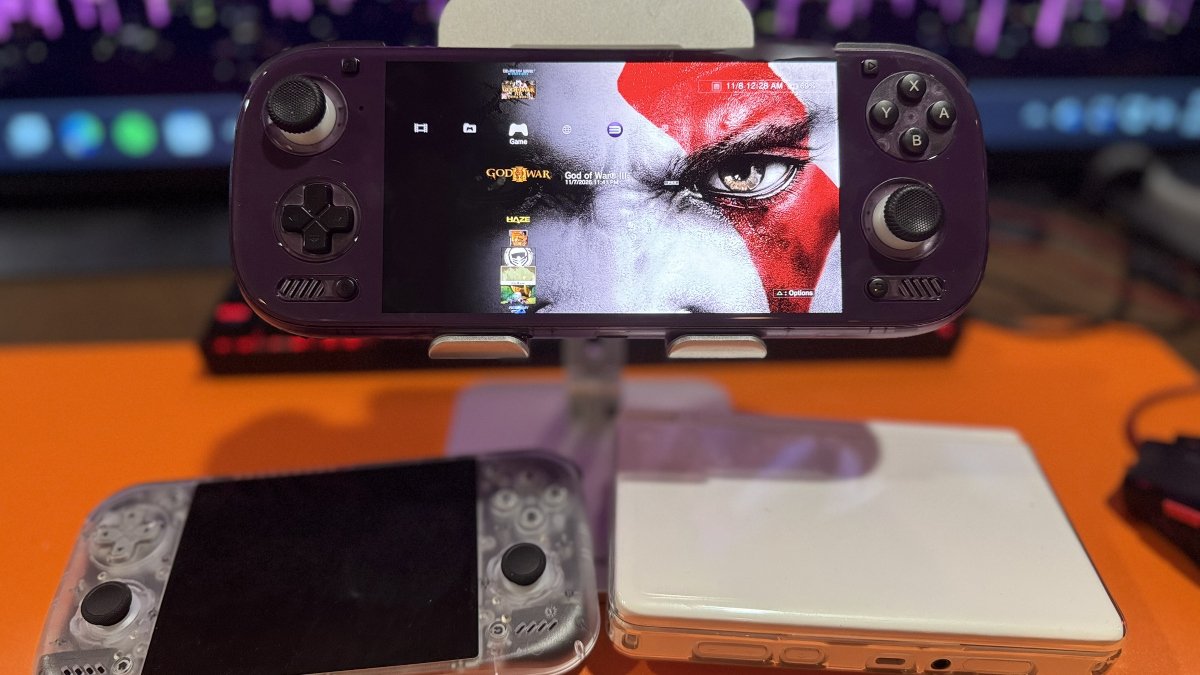
For my own testing, I spent some time with ARMSX3 1.6.6 on the AYN Odin 3 Max. PixelJunk Shooter initially displayed a black screen, but after adjusting three SPU settings, I was able to play at a steady 60 FPS. Scott Pilgrim vs. The World and Metal Slug X also ran at 60 FPS, while Haze maintained a steady 30 FPS during gameplay and cutscenes.
God of War III proved more demanding, with performance fluctuating but generally hovering between 28 and 30 FPS. ARMSX3’s CPU temperature overlay reported readings between 98°C and 101°C with the Odin 3 Max in Performance mode and its fan set to Smart. Despite those readings, the handheld never felt unusually hot to the touch.
I hadn’t tested these games before the recent updates, so I can’t attribute their performance to any specific ARMSX3 improvements. However, these results offer a look at how several PS3 titles currently perform on the Odin 3 Max.
For those curious, I’m still chipping away at TerRover, too. Why isn’t anyone else embracing this gem!? Always the lone wolf, never the sheep.
| ARMSX3 1.6.6 | |
|---|---|
| Cardboard VR & Stereo 3D | Added side-by-side viewing for Cardboard-style headsets, with adjustable image size, eye spacing, and height. Games supporting stereoscopic 3D can display separate views for each eye. |
| God of War III | Changed the default SPU XFloat Accuracy to Relaxed to correct graphical corruption during early cutscenes. |
| Touchscreen Controls | Added adjustable stick travel and improved support for deadzones, sensitivity, response curves, and full diagonal movement. |
| GPU Drivers | Improved driver identification when multiple drivers are included in a release and added MdiEx driver options for Xclipse GPUs. |
| Game Startup | Corrected timing behavior for games checking installed data through helper threads, preventing certain startup failures. |
| ARMSX3 1.6.5 | |
| Ratchet & Clank Performance | Tools of Destruction received another performance improvement. The developer reports an increase from 12 to 25 FPS during a demanding fight on Snapdragon 8 Gen 2. |
| CPU Efficiency | Improved SPU scheduling and reduced CPU usage from idle threads, helping certain games make better use of available processing power. |
| Frame Generation | Reduced frame-generation overhead, potentially improving performance when the feature is enabled. |
| ARMSX3 1.6.4 | |
| Game Compatibility | Improved several Ratchet & Clank titles, with additional fixes for Final Fantasy XIII, Uncharted 3, and God of War: Ascension. |
| 120 Hz Displays | Improved frame-generation support for high-refresh-rate handhelds. Supported games can display generated intermediate frames without increasing their native simulation rate. |
| Save States | Improved save-state restoration, including audio and thread handling, and addressed duplicate save data consuming storage space. |
| ARMSX3 1.6.3 | |
| Game Fixes | Addressed crashes and freezes in Yakuza: Dead Souls, Journey, and Naughty Bear: Panic in Paradise, with additional performance improvements for Naughty Bear. |
| XMB Visual Effects | Added animated sparkles inspired by the original PS3 interface, including motion-based movement on supported devices. |
| ARMSX3 1.6.2 | |
| XMB Media Features | Expanded music playback, visualizers, and video display options, including support for RetroArch shaders during video playback. |
| ARMSX3 GitHub | Official Releases & Changelogs |
Have something to add? Join the PlayItAgain.gg community on Discord to share your thoughts, ask questions, and talk handheld gaming.
JOIN THE CONVERSATION